
Tired of a Messy Downloads Folder? I Built a Python Script to Fix It Forever
Performance Optimization
We’ve all been there. You look at your Downloads folder and it’s a digital graveyard. PDFs mixed wit...
205
JavaScript is a powerful and expressive language that allows you to write complex functionalities in just a single line of code. Whether you’re a beginner or a seasoned developer, these one-liners will help you write cleaner, more efficient, and impressive JavaScript. Let’s dive into some mind-blowing JavaScript tricks!

const reverseString = str => [...str].reverse().join('');Usage:
console.log(reverseString("hello")); // "olleh"This one-liner uses the spread operator ([...]) to convert the string into an array, reverses it, and then joins it back into a string.
const isEven = num => num % 2 === 0;Usage:
console.log(isEven(4)); // true
console.log(isEven(7)); // false
This simple one-liner checks whether a number is even using the modulo (%) operator.
const randomBetween = (min, max) => Math.random() * (max - min) + min;Usage:
console.log(randomBetween(5, 10)); // e.g., 7.234562This generates a random floating-point number within a specified range.
const shuffleArray = arr => arr.sort(() => Math.random() - 0.5);Usage:
console.log(shuffleArray([1, 2, 3, 4, 5]));This one-liner randomly shuffles an array using sort() with a random comparison function.
const removeDuplicates = arr => [...new Set(arr)];Usage:
console.log(removeDuplicates([1, 2, 2, 3, 4, 4, 5])); // [1, 2, 3, 4, 5]This utilizes Set, which automatically removes duplicate values from an array.
const lastElement = arr => arr[arr.length - 1];Usage:
console.log(lastElement([10, 20, 30, 40])); // 40Retrieves the last element by using the array length minus one.
const capitalize = str => str.charAt(0).toUpperCase() + str.slice(1);Usage:
console.log(capitalize("hello")); // "Hello"This one-liner takes the first letter of a string, capitalizes it, and appends the rest of the string.
const isEmptyObject = obj => Object.keys(obj).length === 0;Usage:
console.log(isEmptyObject({})); // true
console.log(isEmptyObject({ a: 1 })); // false
By checking the length of the keys array, we can determine if an object is empty.
const rgbToHex = (r, g, b) => `#${((1 << 24) | (r << 16) | (g << 8) | b).toString(16).slice(1)}`;Usage:
console.log(rgbToHex(255, 99, 71)); // "#ff6347"This one-liner converts RGB color values into a hex code using bitwise operations.
const timestamp = () => Date.now();Usage:
console.log(timestamp()); // 1712345678901This one-liner returns the current timestamp in milliseconds.
JavaScript one-liners can be extremely powerful and save you time when coding. Whether it’s manipulating strings, working with arrays, or performing mathematical calculations, these tricks can make your code more elegant and efficient. Try them out and start coding smarter today!
🔥 Found this blog post helpful? 🔥
If you enjoyed this article and found it valuable, please show your support by clapping 👏 and subscribing to my blog for more in-depth insights on web development and Next.js!
Subscribe here: click me
🚀 Follow me on:
🌐 Website: sagarsangwan.vercel.app
🐦 Twitter/X: @sagar sangwan
🔗 LinkedIn: Sagar Sangwan
📸 Instagram: @codebysagar
Your encouragement helps me continue creating high-quality content that can assist you on your development journey. 🚀

Code. Write. Build. Explore. 💻✍️ Software developer by day, mechanical tinkerer by night. When I’m not shipping code or writing blogs, you’ll find me trekking up a mountain, whipping up a feast, or hitting the open road on two wheels. Life is better in high gear.
View more blogs by me CLICK HERE
We’ve all been there. You look at your Downloads folder and it’s a digital graveyard. PDFs mixed wit...
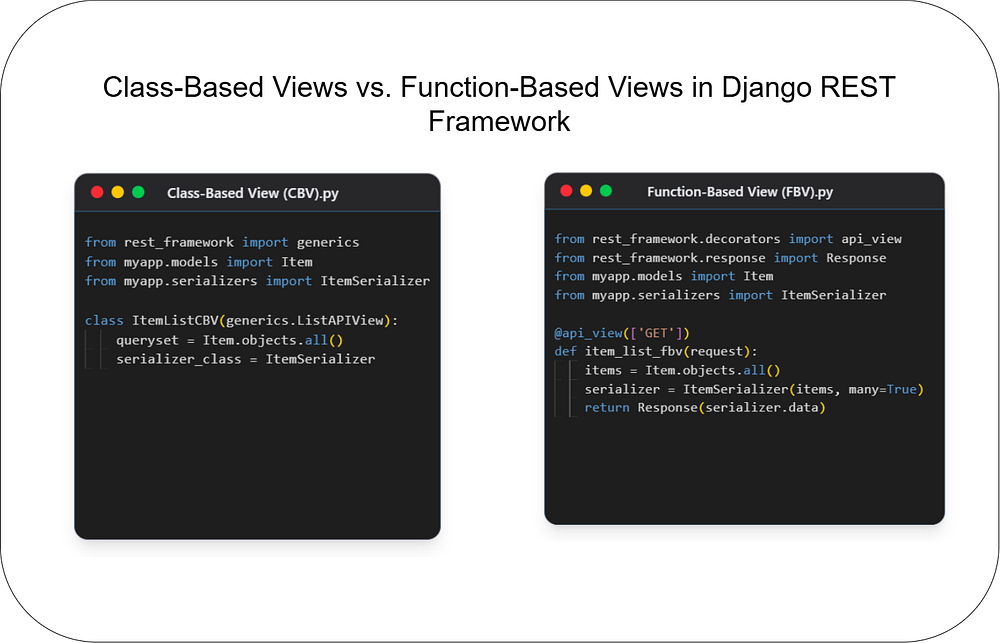
Choosing the right architecture for your API endpoints is crucial for building scalable and maintain...
Unlock the power of React and Next.js! This guide clarifies their key differences, ideal use cases, ...
Subscribe to get the latest posts delivered to your inbox