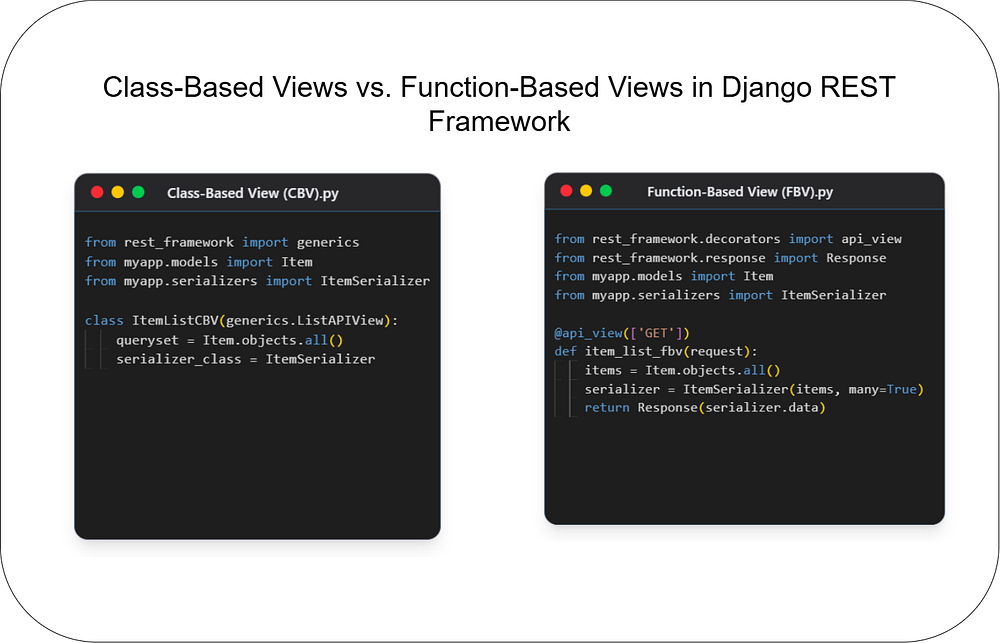
Class-Based Views vs. Function-Based Views in Django REST Framework
Backend
Choosing the right architecture for your API endpoints is crucial for building scalable and maintain...
149
🚀 Want to create a fully automated news website? This tutorial will teach you how to:
✅ Scrape & rank trending news using AI
✅ Fetch full articles (headings, images, links)
✅ Host your API for free on Vercel
✅ Load API keys securely from .env
Let’s build your AI-powered news API from scratch! 🔥
First, install the required Python libraries:
pip install flask requests newspaper3k beautifulsoup4 python-dotenv nltk textblobWe’ll use:
Flask → Create an API
Requests → Fetch news from APIs
Newspaper3k & BeautifulSoup → Scrape full articles
TextBlob & NLTK → Perform sentiment analysis
python-dotenv → Load API keys securely
1️⃣ Go to https://newsapi.org/
2️⃣ Sign up & get your API key
Now, let’s store it securely in a .env file.
.envCreate a .env file in your project folder:
NEWS_API_KEY=your_news_api_keyNow, modify your Flask app to load this key securely:
import os
from dotenv import load_dotenv
# Load API Key from .env
load_dotenv()
NEWS_API_KEY = os.getenv("NEWS_API_KEY")
✅ Now, your API key isn’t exposed in the code!
from flask import Flask, jsonify, request
import requests
import json
from bs4 import BeautifulSoup
from datetime import datetime
import nltk
from textblob import TextBlob
from dotenv import load_dotenv
import os
nltk.download('punkt')
app = Flask(__name__)
# Load API Key
load_dotenv()
NEWS_API_KEY = os.getenv("NEWS_API_KEY")
# Function to fetch news
def fetch_news():
    url = f"https://newsapi.org/v2/top-headlines?country=us&category=general&apiKey={NEWS_API_KEY}"
    response = requests.get(url)
    data = response.json()
    return data.get("articles", [])
# Function to analyze sentiment
def analyze_sentiment(text):
    analysis = TextBlob(text)
    return analysis.sentiment.polarity  # Returns score from -1 to 1
# Function to scrape full article content
def get_full_article(url):
    try:
        response = requests.get(url, headers={"User-Agent": "Mozilla/5.0"})
        soup = BeautifulSoup(response.content, "html.parser")
        # Extract Title
        title = soup.find("h1").get_text() if soup.find("h1") else ""
        # Extract Headings
        headings = [h.get_text() for h in soup.find_all(["h2", "h3"])]
        # Extract Paragraphs
        paragraphs = [p.get_text() for p in soup.find_all("p")]
        # Extract Images
        images = [img["src"] for img in soup.find_all("img") if "src" in img.attrs]
        # Extract Links
        links = [a["href"] for a in soup.find_all("a", href=True)]
        # Construct structured article
        full_article = {
            "title": title,
            "headings": headings,
            "content": "\n".join(paragraphs),
            "images": images,
            "links": links
        }
        return full_article
    except Exception as e:
        return {"error": f"Failed to scrape article: {str(e)}"}
# API to Get Top Ranked News
@app.route('/api/news', methods=['GET'])
def get_news():
    articles = fetch_news()
    ranked_news = sorted(articles, key=lambda x: analyze_sentiment(x["title"]), reverse=True)
    return jsonify(ranked_news[:5])  # Return top 5 news articles
# API to Fetch Full Article
@app.route('/api/full-article', methods=['GET'])
def get_full_news():
    url = request.args.get("url")
    if not url:
        return jsonify({"error": "URL parameter is required"}), 400
    full_article = get_full_article(url)
    return jsonify(full_article)
# Run Flask App
if __name__ == '__main__':
app.run(debug=True)Run the Flask app:
python app.pyNow, visit:
Top news: http://127.0.0.1:5000/api/news
Full article: http://127.0.0.1:5000/api/full-article?url=ARTICLE_URL
Now, let’s deploy our API on Vercel so anyone can access it online!
npm install -g vercelvercel.jsonCreate a vercel.json file in your project:
{
  "version": 2,
  "builds": [{ "src": "app.py", "use": "@vercel/python" }],
  "routes": [{ "src": "/(.*)", "dest": "app.py" }]
}1️⃣ Login to Vercel
vercel login2️⃣ Deploy your Flask API
vercel✅ Your API is now live on a URL like:
👉 https://your-news-api.vercel.app/api/news
🎯 Now you have a fully automated AI-powered news API!
✅ Fetches trending news
✅ Extracts full articles (headings, images, links)
✅ Loads API key securely from .env
✅ Deployed for free on Vercel!
📩 Add email newsletters → Checkout this
📈 Integrate with Next.js → Build a full news website
🧠 Use AI summarization → Auto-generate article highlights
💬 Want help integrating this into a Next.js frontend? Let me know! 🚀

Code. Write. Build. Explore. 💻✍️ Software developer by day, mechanical tinkerer by night. When I’m not shipping code or writing blogs, you’ll find me trekking up a mountain, whipping up a feast, or hitting the open road on two wheels. Life is better in high gear.
View more blogs by me CLICK HERE
Choosing the right architecture for your API endpoints is crucial for building scalable and maintain...
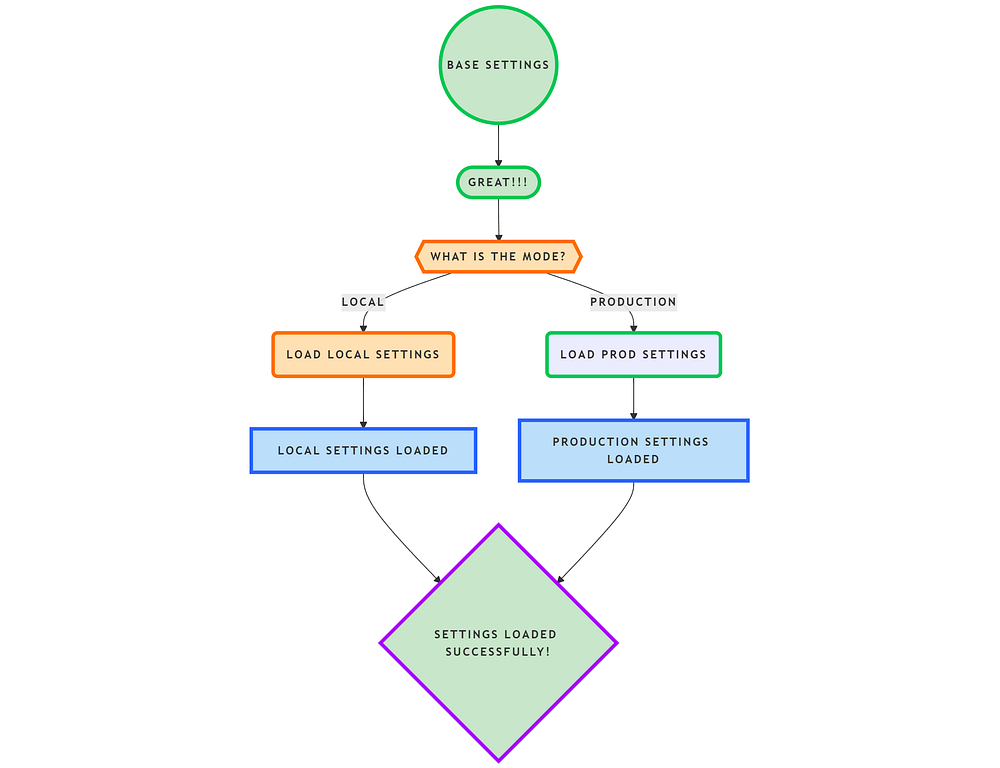
In this blog, we’ll structure Django settings efficiently using a modular approach. We’ll create a s...

The U.S. government has announced a historic $500 billion investment in AI infrastructure. Learn how...
Subscribe to get the latest posts delivered to your inbox