Next.js vs. React: Choosing the Right Framework for Your Project
Next.jsReact
Unlock the power of React and Next.js! This guide clarifies their key differences, ideal use cases, ...
120
Passwords are the first line of defense against unauthorized access, making it crucial to create strong ones. In this blog, we’ll build a real-time password strength meter in Next.js using zxcvbn.js, a library that evaluates password strength and estimates crack time.
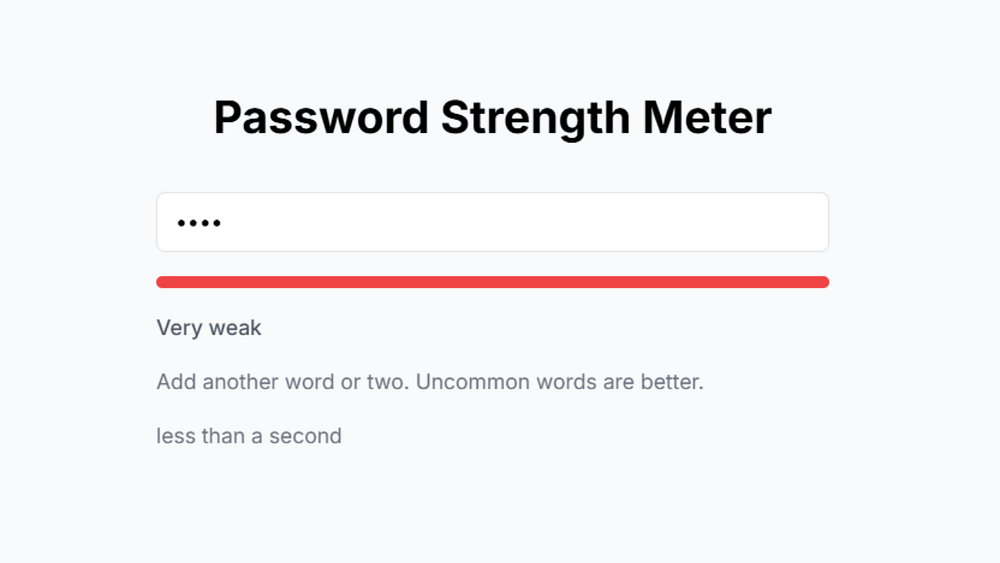
zxcvbn.js is an open-source password strength estimator developed by Dropbox. Unlike simple regex-based checks, it considers dictionary words, common patterns, and substitutions to provide a more realistic strength score.
Real-time password evaluation
Strength score from 0 (very weak) to 4 (very strong)
Estimated time to crack the password
Actionable feedback to improve password security
A color-coded progress bar for visual indication
First, create a new Next.js project if you don’t have one:
npx create-next-app@latest password-strength-meter
cd password-strength-meter
Then, install zxcvbn.js:
npm install zxcvbnCreate a new component PasswordStrengthMeter.js inside the components directory and add the following code:
"use client"
import { useState, useEffect } from "react"
import zxcvbn from "zxcvbn"
import { Input } from "@/components/ui/input"
import { Progress } from "@/components/ui/progress"
export default function PasswordStrengthMeter() {
  const [password, setPassword] = useState("")
  const [score, setScore] = useState(0)
  const [crackTime, setCrackTime] = useState("")
  const [feedback, setFeedback] = useState("")
useEffect(() => {
    if (password) {
      const result = zxcvbn(password)
      setScore(result.score)
      setCrackTime(result.crack_times_display.online_no_throttling_10_per_second)
      setFeedback(result.feedback.suggestions.join(" ") || getScoreText(result.score))
    } else {
      setScore(0)
      setFeedback("")
    }
  }, [password])
  const getScoreText = (score) => {
    switch (score) {
      case 0:
        return "Very weak"
      case 1:
        return "Weak"
      case 2:
        return "Fair"
      case 3:
        return "Strong"
      case 4:
        return "Very strong"
      default:
        return ""
    }
  }
  const getScoreColor = (score) => {
    switch (score) {
      case 0:
        return "bg-red-500"
      case 1:
        return "bg-orange-500"
      case 2:
        return "bg-yellow-500"
      case 3:
        return "bg-lime-500"
      case 4:
        return "bg-green-500"
      default:
        return "bg-gray-200"
    }
  }
  return (
    <div className="w-full max-w-md mx-auto space-y-4">
      <Input
        type="password"
        placeholder="Enter your password"
        value={password}
        onChange={(e) => setPassword(e.target.value)}
        className="w-full"
      />
      <Progress value={(score / 4) * 100} className={`w-full h-2 ${getScoreColor(score)}`} />
      <p className="text-sm font-medium text-gray-600">{getScoreText(score)}</p>
      {feedback && <p className="text-sm text-gray-500">{feedback}</p>}
      {crackTime && <p className="text-sm text-gray-500">{crackTime}</p>}
    </div>
  )
}The useState and useEffect hooks track the password input and dynamically evaluate it.
zxcvbn(password) analyzes the password and returns a score (0-4), estimated crack time, and feedback.
The Progress bar visually represents the password strength using different colors.
The component displays real-time feedback to help users create stronger passwords.
To use this component, import and place it inside a Next.js page (e.g., pages/index.js):
import PasswordStrengthMeter from "@/components/PasswordStrengthMeter"

export default function Home() {
  return (
    <div className="flex items-center justify-center min-h-screen bg-gray-100">
      <PasswordStrengthMeter />
    </div>
  )
}Start your development server:
npm run devNow, open http://localhost:3000 and test the password strength meter.
If you enjoyed this article and found it valuable, please show your support by clapping 👏 and subscribing to my blog for more in-depth insights on web development and Next.js!
Subscribe here: click me
Your encouragement helps me continue creating high-quality content that can assist you on your development journey. 🚀

Code. Write. Build. Explore. 💻✍️ Software developer by day, mechanical tinkerer by night. When I’m not shipping code or writing blogs, you’ll find me trekking up a mountain, whipping up a feast, or hitting the open road on two wheels. Life is better in high gear.
View more blogs by me CLICK HERE
Unlock the power of React and Next.js! This guide clarifies their key differences, ideal use cases, ...

Master JavaScript with these 10 concise and powerful one-liners. Level up your coding skills with ef...

Learn how to use .gitignore effectively to keep your Git repository clean. Avoid committing unnecess...
Subscribe to get the latest posts delivered to your inbox