
Tired of a Messy Downloads Folder? I Built a Python Script to Fix It Forever
Accessibility
We’ve all been there. You look at your Downloads folder and it’s a digital graveyard. PDFs mixed wit...
205

The Ultimate .gitignore Guide for Django and Next.js Projects
When working with Git, keeping your repository clean is essential. Some files should not be tracked, such as dependencies, compiled files, environment variables, and build outputs. The .gitignore file helps prevent these unnecessary files from being committed to your repository. In this blog, we will cover the best .gitignore practices for Django and Next.js projects to ensure your repository stays optimized.
.gitignore File?A .gitignore file is a text file that tells Git which files and directories to ignore in a project. It prevents unnecessary or sensitive files from being tracked, making repositories lighter and more secure.
.gitignore Works:It uses pattern matching to ignore specific files and folders.
It applies rules in order from top to bottom.
Files already tracked by Git will not be ignored unless explicitly removed.
Now, let’s dive into the best .gitignore configurations for Django and Next.js projects.
.gitignore for Django ProjectsA Django project contains many files that should not be included in version control, such as virtual environments, database files, and compiled Python files. Below is an optimized .gitignore template for Django:
# Ignore Python cache files
*.pyc
__pycache__/
# Ignore SQLite database
*.sqlite3
# Ignore environment variables and settings
.env
# Ignore logs and backups
*.log
*.bak
# Ignore virtual environments
venv/
.env/
# Ignore Django migrations cache
*.pyc
migrations/**/__pycache__/
# Ignore media and static files
media/
static/
# Ignore IDE and editor settings
.vscode/
.idea/
# Ignore testing and coverage reports
.tox/
.coverage
htmlcov/
.pytest_cache/
# Ignore deployment files
*.tar.gz
*.zip*.pyc, __pycache__/ → Ignore compiled Python files.
*.sqlite3 → Ignore SQLite database files.
.env → Ignore environment variables that store sensitive information.
venv/, .env/ → Ignore virtual environments.
media/, static/ → Ignore media uploads and static files.
.vscode/, .idea/ → Ignore local IDE configurations.
.coverage, .pytest_cache/ → Ignore test and coverage reports.
.gitignore for Next.js ProjectsNext.js projects generate several build artifacts, cache files, and dependencies that should not be committed. Below is a well-structured .gitignore file for Next.js:
# Ignore dependencies
/node_modules/
# Ignore Next.js build and cache files
/.next/
/out/
# Ignore environment variables
.env*
# Ignore log files and debugging outputs
npm-debug.log*
yarn-debug.log*
# Ignore local IDE settings
.vscode/
.idea/
# Ignore testing coverage reports
/coverage/
# Ignore MacOS system files
.DS_Store/node_modules/ → Ignore dependencies managed by npm or yarn.
/.next/, /out/ → Ignore build and cache directories.
.env* → Ignore all environment files for security.
.vscode/, .idea/ → Ignore IDE-specific settings.
/coverage/ → Ignore test coverage reports.
.DS_Store → Ignore macOS-specific system files.
.gitignoreKeep It Updated: As your project evolves, update your .gitignore to match new dependencies and generated files.
Use Global .gitignore: You can create a global .gitignore file for common system-wide files.
Check Before Committing: Always review ignored files using git status to avoid accidental commits.
Untrack Files If Necessary: If you mistakenly commit a file that should be ignored, use git rm --cached <file> to remove it from tracking.
A well-structured .gitignore file ensures that your Django and Next.js projects stay clean, secure, and efficient. By ignoring unnecessary files, you improve repository performance and prevent sensitive data from being exposed.
Let me know in the comments! If you’re working on Django or Next.js, feel free to share your .gitignore best practices. 🚀

Code. Write. Build. Explore. 💻✍️ Software developer by day, mechanical tinkerer by night. When I’m not shipping code or writing blogs, you’ll find me trekking up a mountain, whipping up a feast, or hitting the open road on two wheels. Life is better in high gear.
View more blogs by me CLICK HERE
We’ve all been there. You look at your Downloads folder and it’s a digital graveyard. PDFs mixed wit...
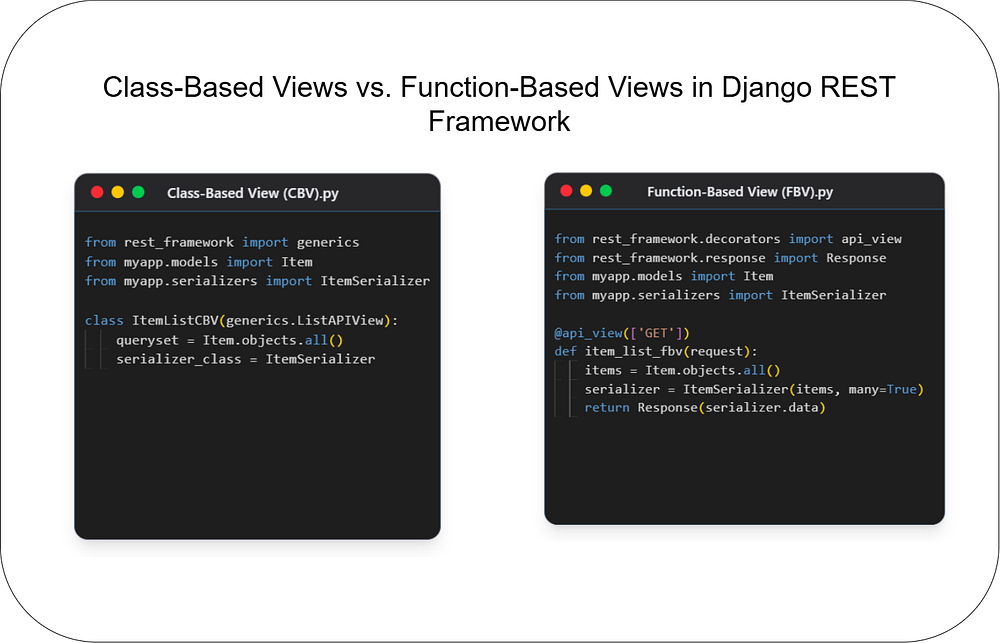
Choosing the right architecture for your API endpoints is crucial for building scalable and maintain...
Unlock the power of React and Next.js! This guide clarifies their key differences, ideal use cases, ...
Subscribe to get the latest posts delivered to your inbox