Building a Login System with FastAPI, Google OAuth, and JWT
oauth
In this part of the CreatorCopilot series, we are building a dedicated authentication service using ...
121

NOT A PREMIUM MEMBER : READ HERE
Most authentication guides online are demos.
They help you log in a user — but they don’t help you build a system.
If you’re building anything serious, auth is infrastructure. Not UI.
This is Part 2 of building CreatorCopilot, where we integrate Google OAuth properly using Auth.js.
👉 Watch Part 1 (Architecture): https://youtu.be/w0Cz941iL_4?si=YeaD4ltRarEaWiHl
👉 Watch Part 2 (Implementation): https://youtu.be/29gfFHBroVE?si=J9c_ZxPOBfWFczt2
Most people make these mistakes:
Treat auth as frontend-only
Store too much logic in Next.js
Ignore token lifecycle
Skip backend integration thinking “we’ll fix later”
That “later” becomes a rewrite.
npm install next-auth@betaThis version aligns with the App Router and modern patterns.
npx auth secretThis adds:
AUTH_SECRET="your_generated_secret"Weak secrets = weak security.
In Google Cloud Console:
Create project
Setup OAuth consent screen
Create credentials
Add redirect URI:
http://localhost:3000/api/auth/callback/googleMiss this → login breaks.
AUTH_SECRET="your_secret"
AUTH_GOOGLE_ID="your_client_id"
AUTH_GOOGLE_SECRET="your_client_secret"import NextAuth from "next-auth"
import Google from "next-auth/providers/google"
export const { handlers, signIn, signOut, auth } = NextAuth({
providers: [Google],
})One file controls everything.
import { handlers } from "@/lib/auth"
export const { GET, POST } = handlersimport { signIn } from "@/lib/auth"
export default function SignIn() {
return (
<form action={async () => {
"use server"
await signIn("google")
}}>
<button>Sign in with Google</button>
</form>
)
}import { signOut } from "@/lib/auth"
export default function SignOut() {
return (
<form action={async () => {
"use server"
await signOut()
}}>
<button>Sign Out</button>
</form>
)
}import { auth } from "@/lib/auth"
export default async function Page() {
const session = await auth()
return (
<main>
{session?.user ? (
<p>Welcome {session.user.name}</p>
) : (
<p>Please sign in</p>
)}
</main>
)
}Secure session handling
Google OAuth integration
Server-side auth access
Clean architecture foundation
But don’t assume you’re done.
Right now:
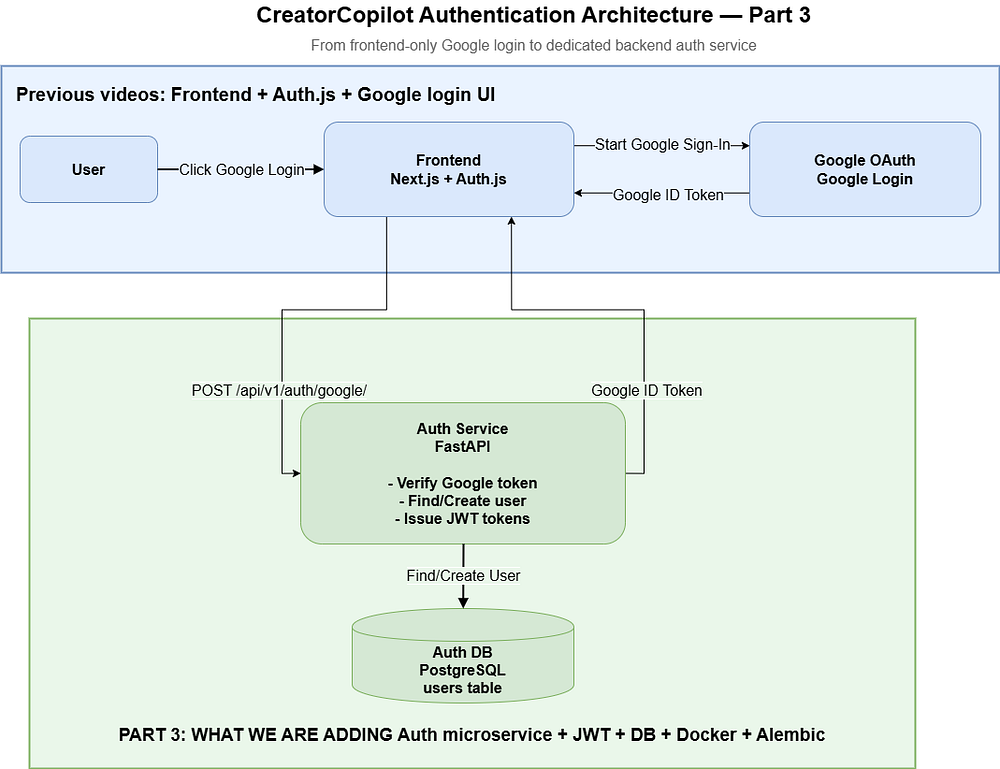
Google verifies identity
Next.js manages session
But:
No backend validation
No user persistence control
No role-based access
Send Google token → FastAPI backend
Verify token server-side
Create/fetch user in DB
Issue backend JWT
Control access via backend
If you skip this, your app is just a frontend demo.
Getting login working is easy.
Building authentication that scales and integrates with backend systems is the real challenge.
🔥 Found this blog post helpful? 🔥
If you enjoyed this article and found it valuable, please show your support by clapping 👏 and subscribing to my blog for more in-depth insights on web development and Next.js!
Subscribe here: click me
🚀 Follow me on:
🌐 Website: sagarsangwan.dev
🐦 Twitter/X: @sagar sangwan
🔗 LinkedIn: Sagar Sangwan
📸 Instagram: @codingbysagar
▶️YouTube: @codingbysagar
Your encouragement helps me continue creating high-quality content that can assist you on your development journey. 🚀

Code. Write. Build. Explore. 💻✍️ Software developer by day, mechanical tinkerer by night. When I’m not shipping code or writing blogs, you’ll find me trekking up a mountain, whipping up a feast, or hitting the open road on two wheels. Life is better in high gear.
View more blogs by me CLICK HERE
In this part of the CreatorCopilot series, we are building a dedicated authentication service using ...

A practical guide to protecting your APIs from bots using rate limiting, request throttling, caching...

Learn how to build an email queue system in Next.js with Drizzle, Postgres, and Brevo SMTP including...
Subscribe to get the latest posts delivered to your inbox